Organize your thoughts. Build your personal knowledge base.

Trilium is an open-source solution for note-taking and organizing a personal knowledge base. Use it locally on your desktop, or sync it with your self-hosted server to keep your notes everywhere you go.

AGPL-3.0 licensedNo account neededWorks offline

Structure your notes, your way
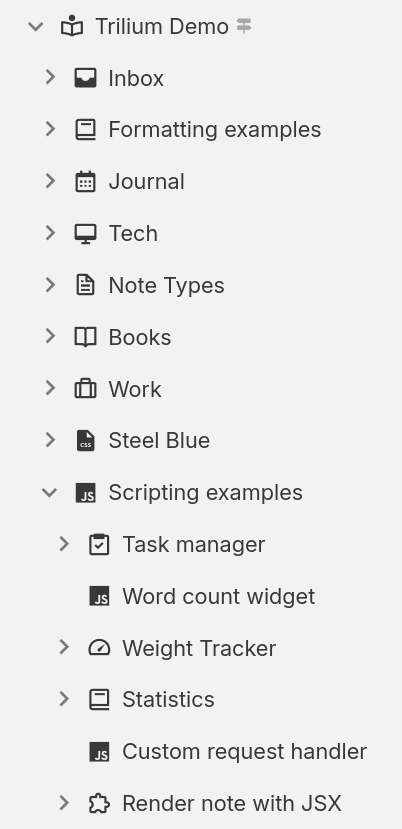
Hierarchical note tree in Trilium

Note structure

Notes can be arranged hierarchically. There's no need for folders, since each note can contain sub-notes. A single note can be added in multiple places in the hierarchy.

Note labels and relations

Use relations between notes or add labels for easy categorization. Use promoted attributes to enter structured information which can be used in tables and boards.

Workspaces and hoisting

Easily separate your personal and work notes by grouping them under a workspace, which focuses your note tree to only show a specific set of notes.

Everyday power features

Synchronization

Use a self-hosted or cloud instance to easily synchronize your notes across multiple devices, and to access it from your mobile phone using a PWA.

Search & quick navigation

Jump to any note or command by title with fuzzy matching, or run a full-text search across your notes, even text inside images and PDFs via OCR.

Note revisions

Notes are periodically saved in the background and revisions can be used for review or to undo accidental changes. Revisions can also be created on-demand.

Protected notes

Protect sensitive personal information by encrypting the notes and locking them behind a password-protected session.

Templates

Define reusable note templates with a preset structure, attributes and content, then create new notes from them in a click.

Web clipper

Grab web pages (or screenshots) and place them directly into Trilium using the web clipper browser extension.

Share notes on the web

If you have a server, publish any subtree of your notes as a public, read-only website that anyone can browse without an account.

Secure sign-in

Protect your server login with multi-factor authentication (TOTP), or sign in through your identity provider with OpenID Connect.

REST API

Read, create and update your notes programmatically over HTTP with Trilium's built-in REST API, ideal for automations and third-party integrations.

A note type for every kind of content

Not everything fits neatly into a paragraph. Trilium offers a range of note types, from rich text and code to spreadsheets, diagrams and mind maps, so you can capture each idea in the form that suits it best and mix them freely throughout your tree.

Text notes

Text notes

The notes are edited using a visual (WYSIWYG) editor, with support for tables, images, math expressions, code blocks with syntax highlighting. Quickly format the text using Markdown-like syntax or using slash commands.

Your notes are never locked in

Your notes are yours to move freely. Bring them in from other apps, take them back out in open formats, or turn them into polished documents, whenever you like.

Import

Pull your notes in from other apps with their structure intact, or import standard Markdown, HTML and OPML files.
Imports directly from

Export

Take any note or your entire tree back out in an open, portable format at any time:
  • Markdown for portable plain text
  • HTML for self-contained pages
  • OPML for outlines

Print to PDF

Turn your notes into a polished, book-like PDF:
  • A single note
  • An entire subtree, kept in order
  • Ready to print or share

See your notes from every angle

Collections give a group of notes a purpose-built view. Display the very same notes as a calendar, a table, a Kanban board, an interactive map and more, then switch between layouts whenever your needs change.

Calendar

Calendar

Organize your personal or professional events using a calendar, with support for all-day and multi-day events. See your events at a glance with the week, month and year views. Easy interaction to add or drag events.

If you can imagine it, you can script it

Trilium isn't just a place to store notes, it's programmable. Write JavaScript that runs in the app or on the server, build your own interface, and automate your workflows, from a one-line tweak to a full custom app.
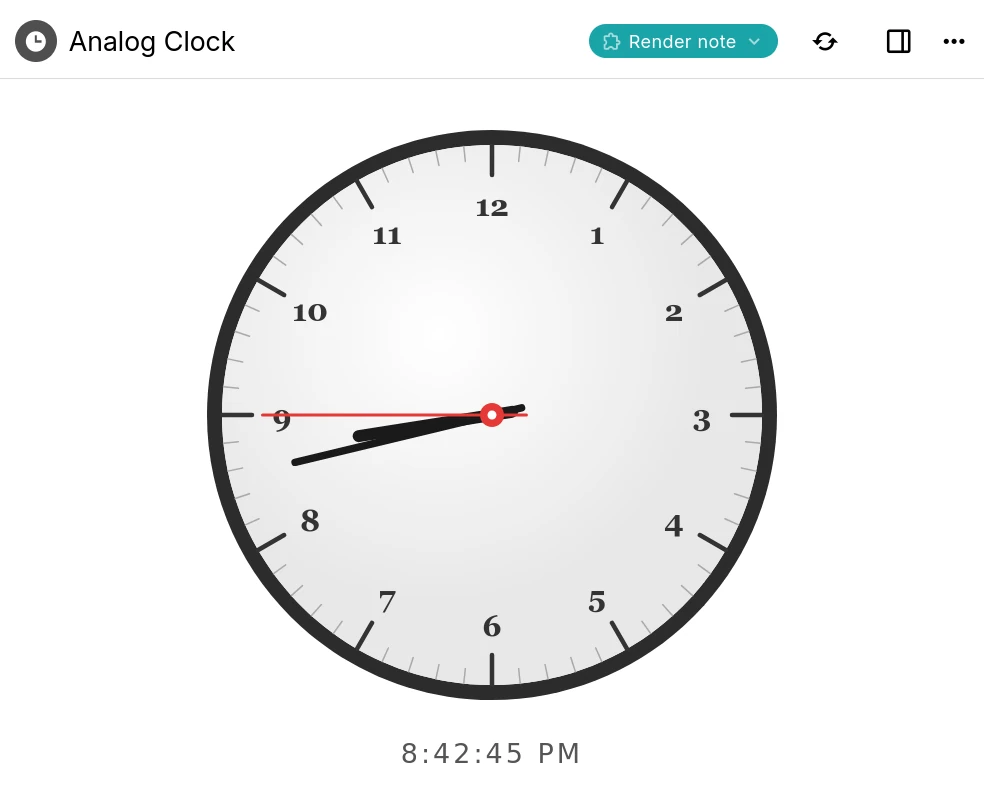
A Trilium render note displaying an interactive analog clock built with a script

Custom widgets

Add your own buttons, panels and launcher widgets to Trilium's interface using frontend JavaScript.

Backend scripts & events

Run server-side scripts on a schedule or in response to events such as creating or changing a note.

Render notes

Build interactive dashboards and mini-apps that render right inside a note, like the clock shown here.

Script API

A typed API for notes, branches, attributes and search, available to both frontend and backend scripts.

AI on your terms

Optional, and entirely on your terms. AI features are opt-in and disabled by default: your notes are never sent anywhere unless you enable them and connect your own provider.
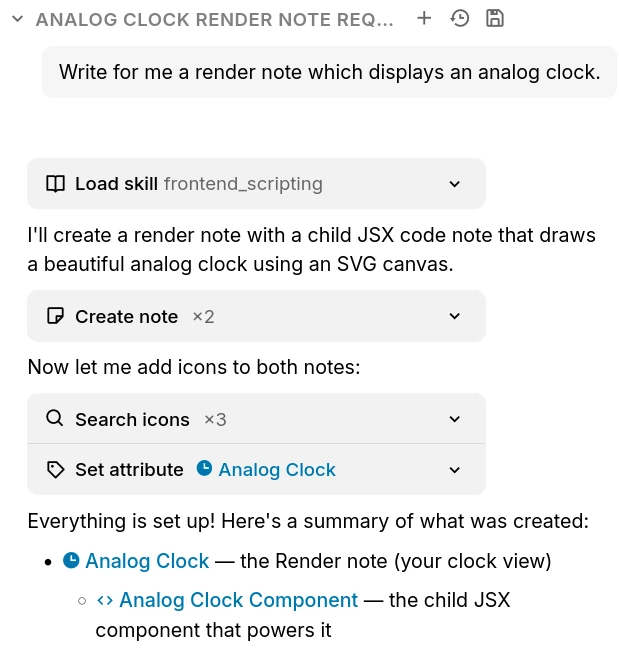
The Trilium AI chat creating notes on your behalf through built-in tools

Chat with your notes

Ask questions and brainstorm in a built-in chat that can draw on the content of your own notes.

AI that works with your notes

Let an assistant search, create and update notes on your behalf through a set of built-in tools.

Your provider, your keys

Connect OpenAI, Anthropic or Google with your own API key, or point Trilium at a self-hosted, OpenAI-compatible model. Expose your notes to external assistants over MCP.

Frequently Asked Questions

Is Trilium free?
Yes, completely. Trilium is free and open-source under the AGPL-3.0 license, with no paid tiers, accounts or feature paywalls. You're free to use, self-host and modify it however you like.
Is there a mobile application?
Currently there is no official mobile application. However, if you have a server instance you can access it using a web browser and even install it as a PWA. For Android, there is an unofficial application called TriliumDroid that even works offline (same as a desktop client).
Do I need a server to use Trilium?
No, the server allows access via a web browser and manages the synchronization if you have multiple devices. To get started, it's enough to download the desktop application and start using it.
Is there a hosted or cloud version?
Not an official one yet, though it's something we'd like to offer in the future. For now Trilium is self-hosted: run the desktop app, or host the server yourself. If you'd rather not manage a server, third-party providers such as PikaPods offer managed Trilium hosting.
Can multiple people collaborate on the same notes?
Trilium is designed as a single-user application. You can sync your own notes across all of your devices, and publish read-only notes to the web for others to view, but real-time multi-user editing of the same notes isn't supported.
Where is the data stored?
All your notes will be stored in an SQLite database in an application folder. Trilium uses a database rather than plain-text files for two reasons: performance and some features such as being placing the same note in multiple places in the tree would be much harder to implement otherwise. To find the application folder, simply go to the About window.
How well does the application scale with a large amount of notes?
Depending on usage, the application should be able to handle at least 100,000 notes without an issue. Do note that the sync process can sometimes fail if uploading many large files (1 GB per file) since Trilium is meant more as a knowledge base application rather than a file store (like NextCloud, for example).
Can I share my database over a network drive?
No, it's generally not a good idea to share a SQLite database over a network drive. Although sometimes it might work, there are chances that the database will get corrupted due to imperfect file locks over a network.
How is my data protected?
By default, notes are not encrypted and can be read directly from the database. Once a note is marked as encrypted, the note is encrypted using AES-128-CBC.

Still have questions? Ask the community

Start building your knowledge base

Organize everything in one open-source app: hierarchical notes, powerful search, and sync to a server you control.